

Live video transport for broadcast workflows
Move live SDI and NDI between locations — without rebuilding your broadcast workflow
Video Transport turns Windows workstations into contribution and receive nodes for production-quality video over the public Internet. Connect SDI, NDI, cameras and remote guests with configurable latency and WebRTC transport, GPU encoding and broadcast-ready outputs.
- Sub-200 ms in suitable network conditions
- WebRTC
- SDI, NDI and browser contribution
- H.264, HEVC and AV1 support
- Cloud or on-premises deployment
Access the latest Video Transport software package. Portable Windows applications; no hardware appliance required.
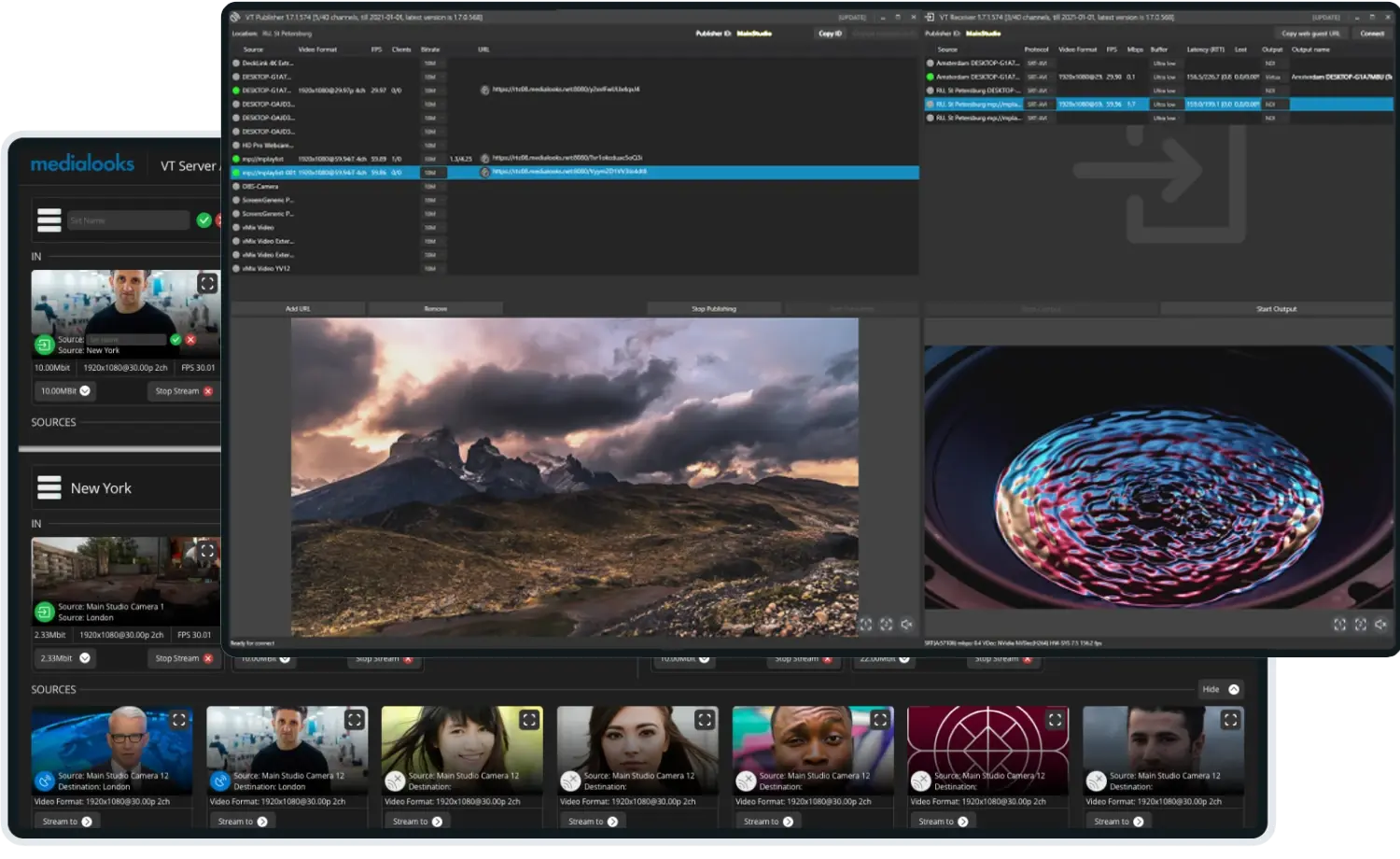
Trusted in professional video workflows
Trusted by teams who kept their existing infrastructure
Video Transport connects remote productions, facilities and contributors without replacing the SDI and NDI workflows already in operation.
Selected customers



Compatible with the gear already in the rack
Your signals are remote. Your workflow does not have to be.
Sending a live feed over the Internet shouldn't force the control room to use consumer calling apps, give up SDI and NDI, or build a custom transport stack for every production.
Extend the signal path, not the production footprint
Send contribution feeds to the control room while keeping switching, graphics, audio and monitoring at the production hub.
Use the interfaces already in the rack
Take in SDI, HDMI, NDI, cameras, audio devices and supported network streams. Deliver the received feed as NDI, SDI, audio or a virtual output.
Choose the right latency for the job
Run close to real time, add recovery time when reliability matters, or use a fixed buffer when multiple feeds need to arrive together.
Operate from anywhere
Publish, route, monitor and configure distributed VT nodes from the Control Panel or through the VT API.
One transport layer.
Every side of the production.
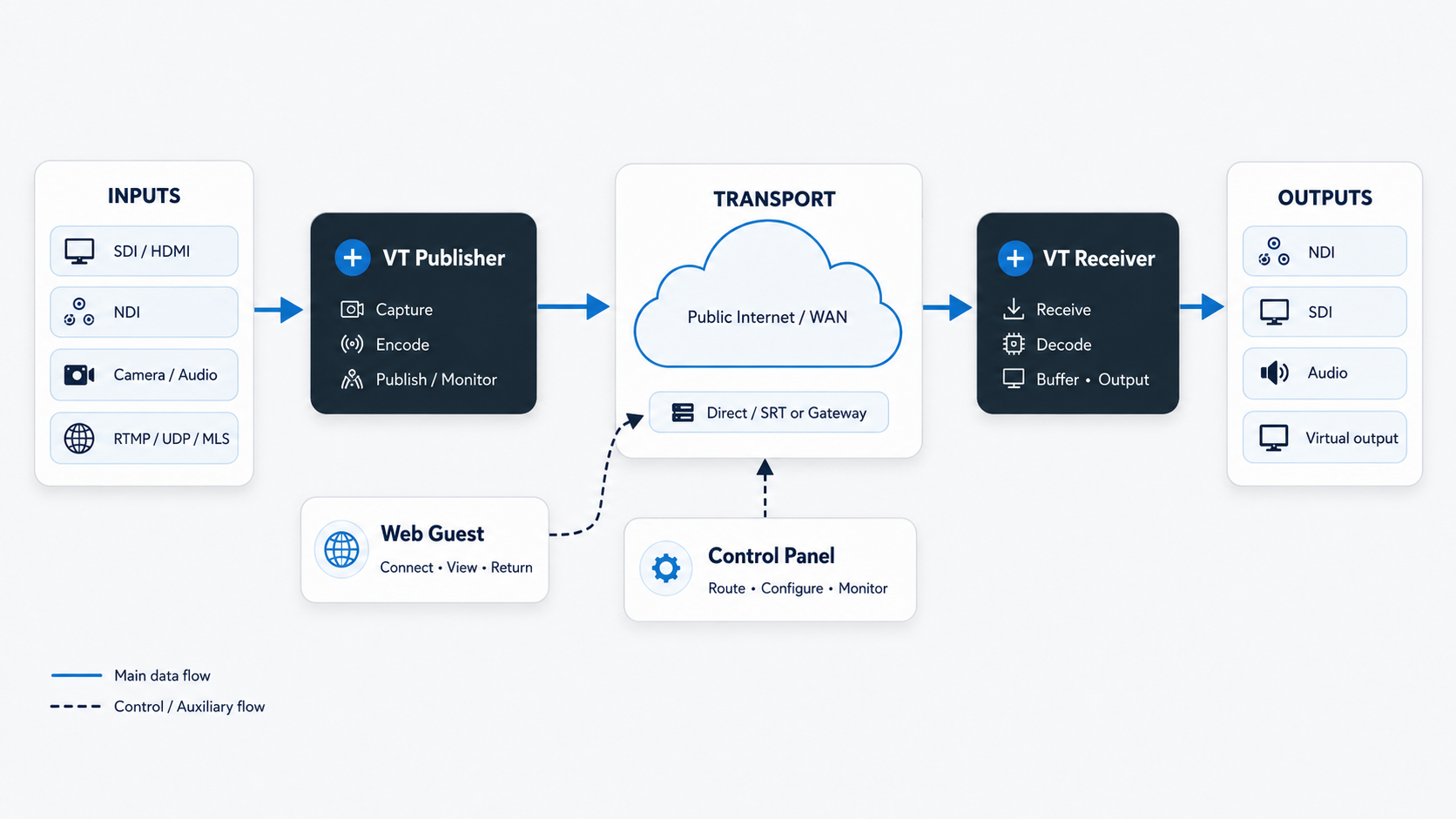
Primary Video Transport signal flow
- 1
Publish
Capture an SDI, NDI, camera, audio or supported network source.
- 2
Connect
Attempt a direct peer-to-peer path; use a gateway when a direct connection is unavailable.
- 3
Receive
Decode the feed, apply the required buffer and make it available to the local workflow.
- 4
Control
Route, preview and monitor distributed locations from the Control Panel.
From one return feed to a distributed production
REMI and multi-camera production
Move camera feeds from a venue to a central control room and use fixed buffers for predictable arrival timing.
Path
Venue cameras → Publisher → WAN → Receiver outputs → production switcher
Remote contribution
Bring anchors, commentators and interview guests into a native SDI or NDI production.
Path
Guest camera + mic ↔ studio return → SDI/NDI production
Program return and confidence monitoring
Deliver a low-latency program feed to talent, directors, clients, judges or engineering teams.
Path
Program output → Publisher → Receiver or Web Preview
Connect facilities and remote post-production
Bridge studios, edit suites, MCRs and remote teams without replacing the local production stack.
Path
Facility A SDI/NDI ↔ Video Transport ↔ Facility B SDI/NDI
Control the trade-off between speed, quality and resilience
Configurable latency
Choose real-time, ultra-low, low, reliable or fixed buffering at the receiver.
Error recovery
Use retransmission and Forward Error Correction to protect the feed against packet loss.
GPU-accelerated codecs
Use H.264, HEVC and AV1 on supported NVIDIA hardware, plus CPU H.264, Quick Sync options and VP9.
Production formats
Transport HD and UHD video with configurable bitrates up to 50 Mbps.
Multi-channel audio
Carry up to 16 audio channels with masks, external audio, ASIO splitting and contributor mixes.
Metadata and control
Carry supported NDI metadata, VANC closed captions and timecode.
Real-time / Ultra-low
Minimal buffering. Prioritizes immediacy over recovery.
Low / Balanced
Moderate buffering. Some recovery headroom for typical networks.
Reliable
Large buffer. Maximum time to retransmit and recover lost packets.
Lower latency prioritizes immediacy; a larger buffer gives the transport more time for recovery. Values are illustrative.
| Operating goal | Suggested mode | Typical use |
|---|---|---|
| Minimum delay | Real-time / Ultra-low | Interview, interactivity, return feed |
| Balanced operation | Low | General contribution |
| Maximum recovery | Reliable | Unstable or long-distance network |
| Predictable arrival | Fixed buffer | Multi-camera REMI |
Direct when possible. Routed when necessary.
Video Transport handles connection establishment separately from the media path, so teams can deploy quickly and retain routing control in restricted environments.
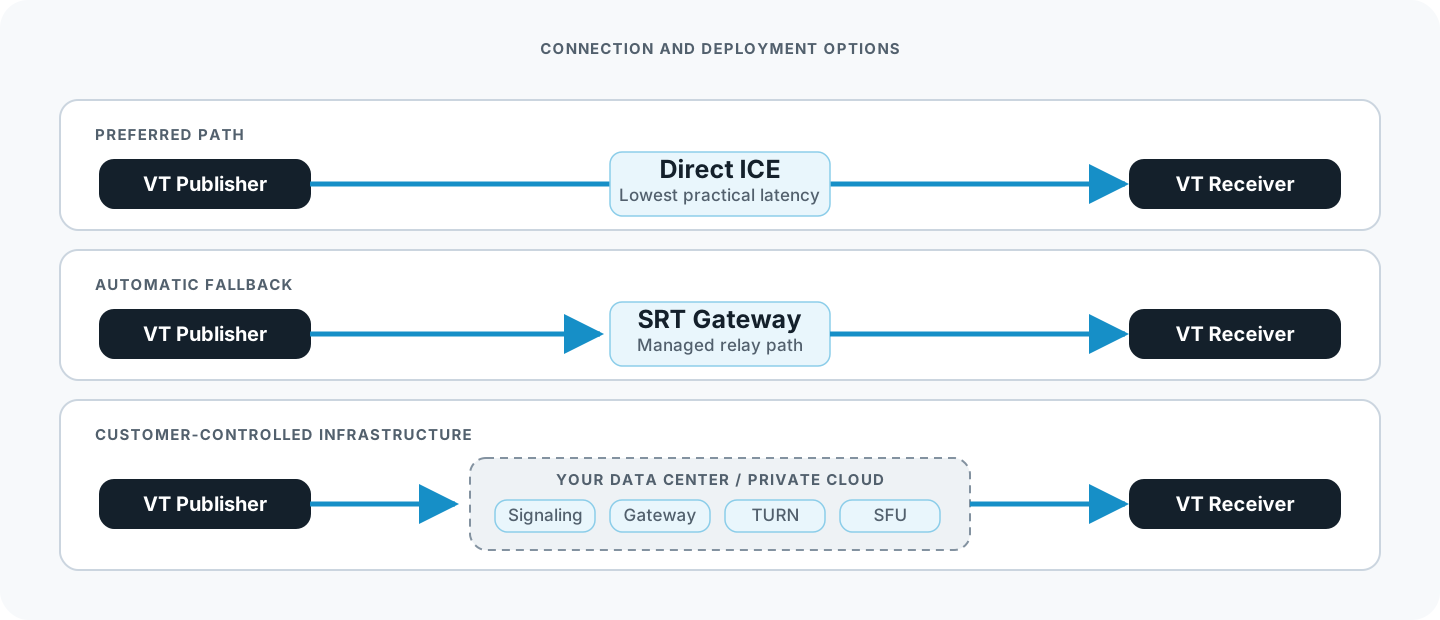
Direct, routed and customer-controlled connection paths
Network requirements
- Signaling: TCP 8443; TCP 8080 for legacy deployments
- VT Gateway: outgoing UDP 7777
- WebRTC TURN/STUN: UDP/TCP 3478
- Custom Publisher/Receiver ICE port range: supported
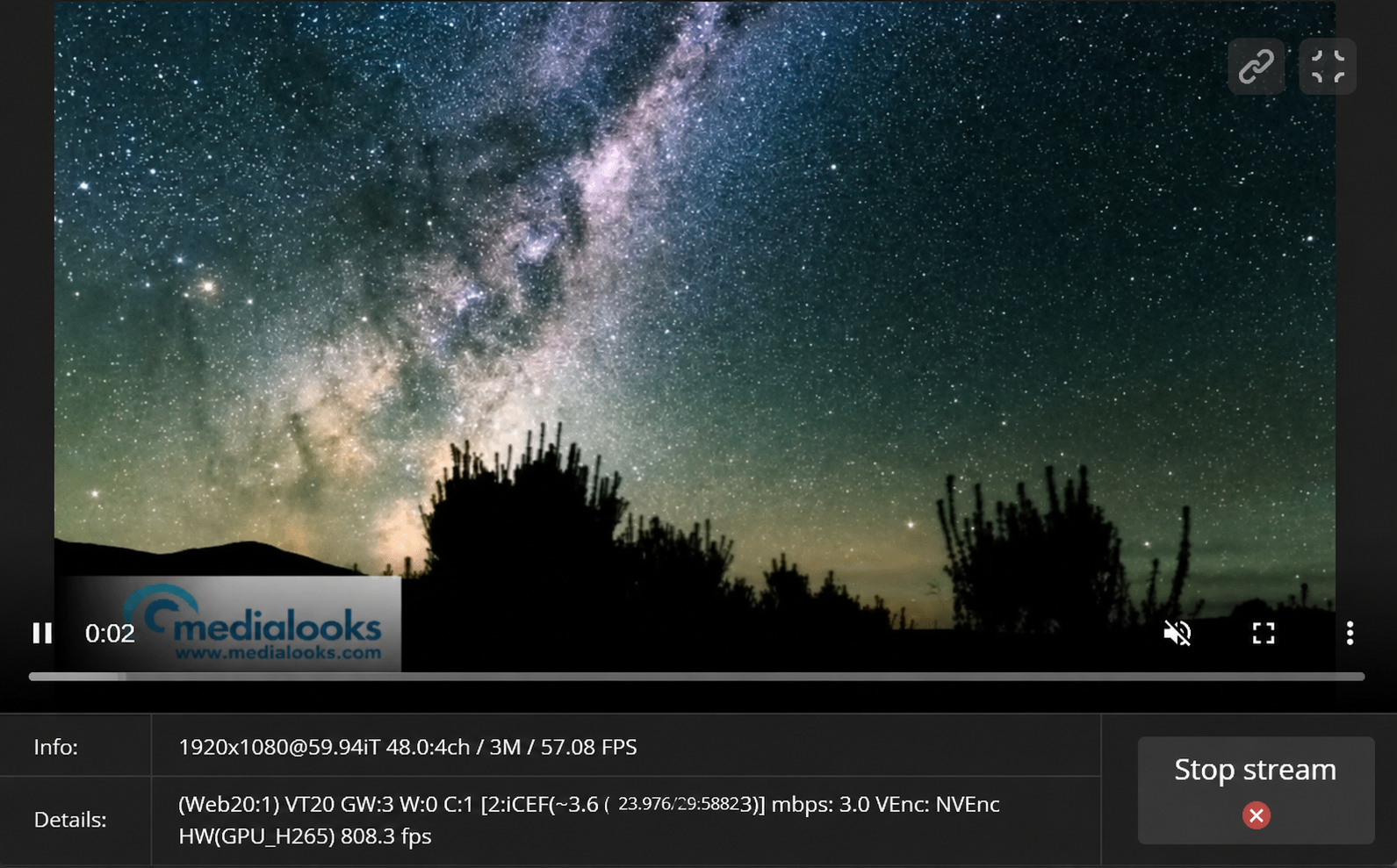
Locations · Inbound feeds · Outbound feeds · Live bitrate and stream count
Live sample
VT20 · ICE · C:1 · 9.1 Mbps · NVENC HEVC · Latency 159 ms · RTT 19 msThe information engineers need — while the feed is live
Monitor the source, connection and decoded output from the desktop applications or the Control Panel.
- Protocol and direct/gateway mode
- Actual bitrate and codec
- Encoder and decoder performance
- Format, frame rate and audio-channel count
- Packet and chunk loss
- End-to-end latency and RTT
- Connected receivers, guests and browser viewers
Bring remote contributors into the same signal chain
Send a secure contribution link or deploy VT Guest when the production needs a reliable transport protocol, GPU encoding, and a controlled contribution kit.
Automatic per-guest mix-minus can create individual return mixes for up to eight Web Guests.
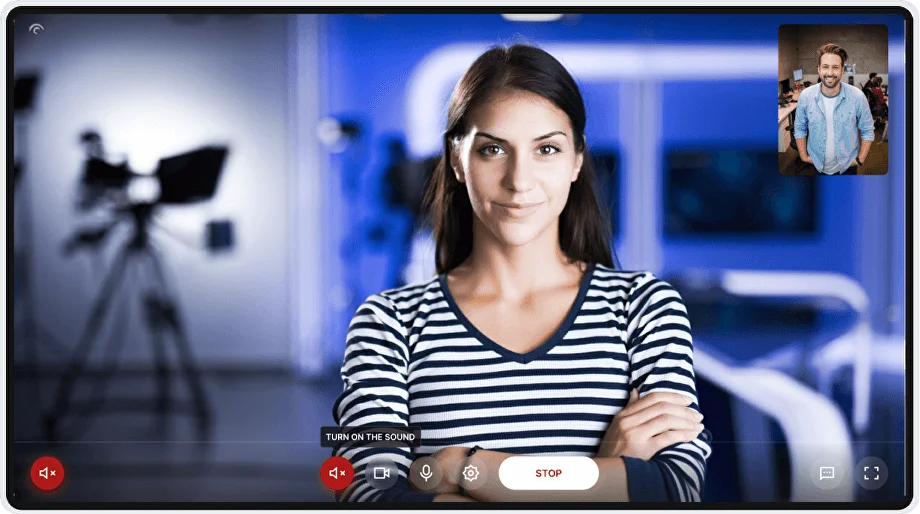
Web Guest
Browser-based- Runs in a modern browser
- Camera and microphone over WebRTC
- Studio return in the same page
- Producer-controlled settings
VT Guest
Native application- Native Windows application
- GPU encoding
- SDI, NDI, DirectShow and audio inputs
- Designed for managed contribution kits
Deploy only the components your workflow needs
VT Publisher
Captures and publishes local SDI, NDI, video, audio and supported IP sources.
VT Receiver
Receives a feed, applies transport settings and exposes it to the local production.
VT Guest
Provides a bidirectional native contribution endpoint.
VT Server
Combines Publisher and Receiver services for unattended locations.
Control Panel
Manages locations, routes, previews and transport parameters from a browser.
All native applications are delivered in one portable Windows package. No installer is required.
On-premises Video Transport
Own the transport layer when the workflow demands it
Deploy signaling, TURN, VT Gateway and optional SFU services in your own data center, private network or cloud account.
- Control media routes Define where traffic is allowed to travel and place gateway infrastructure close to production locations.
- Build predictable operating costs Scale infrastructure around major events and reduce it when demand falls.
- Improve resilience and route quality Place services in regions and facilities that make sense for contribution paths.
- Deliver under your own brand Host Web Guest and Web Preview on your domain and apply a white-label interface.
- Integrate with existing operations Connect Video Transport to a NOC, MCR, booking system or customer portal.
- Control stream access Use individual accounts, activation windows, expiration times and connection limits.
Automation and integration
Build Video Transport into your own control plane
The Socket.IO-based VT API provides programmatic control of VT Publisher, VT Receiver and VT Server. It is designed for on-premises deployments and requires a dedicated API license.
- Discover and monitor nodes Track Publisher and Receiver managers as locations join or leave a production room.
- Create and control routes Enumerate sources and devices, start or stop channels and choose receiver outputs.
- Read operational data Retrieve format, frame rate, codec, bitrate, connection state and JPEG preview frames.
- Control remote contributors Read and update Web Guest camera, microphone, format, codec, bitrate and audio settings.
{
  "type": "command",
  "to": "receiver-manager-id",
  "command": {
    "command": "channel_start",
    "channel": "remote-camera-1",
    "props": "mode='NDI'"
  }
} Choose the deployment model that fits the operation
Cloud-based Video Transport
Starting at $450 for three months
Use Medialooks-hosted signaling and connectivity services without deploying server-side infrastructure.
- Publisher, Receiver, Guest and Server
- Web-based Control Panel
- Web Guest and Web Preview
- Hosted signaling and connectivity infrastructure
- Product updates and documentation
On-premises Video Transport
Custom pricing
Run signaling, TURN, VT Gateway and optional SFU services in customer-controlled infrastructure.
- Private cloud, data-center or closed-network deployment
- Custom gateway topology and SFU
- White-label web experiences
- VT API integration
- Deployment planning and onboarding
What counts as a channel?
One channel generally represents one active native transmission or one connected Web Guest.
Check the fit before you deploy
Put one real feed through it.
Evaluate Video Transport with your own source, network and destination — or send us the workflow and we will help plan the test.
Portable Windows package · Cloud or on-premises · Technical onboarding available
Engineering FAQ
What latency should we expect?
In a suitable network, real-time mode can operate around 50–150 ms. Actual latency depends on RTT, buffering, encoding, decoding and output processing.
Does every deployment require public inbound ports?
Not necessarily. Video Transport uses ICE and can fall back to VT Gateways or TURN. Restricted environments can define a specific UDP range or deploy on-premises.
Can we synchronize several remote camera feeds?
Receiver instances can use the same fixed buffer for predictable arrival timing.
Which codecs are available?
Desktop workflows support H.264, HEVC and recent NVIDIA AV1 implementations. Browser contribution uses WebRTC with H.264 or VP9.
Can it integrate with SDI and NDI at the same time?
Yes. Publisher and Receiver can bridge supported SDI/HDMI devices, NDI, cameras, audio devices and network streams.
Can we keep the infrastructure inside our network?
Yes. The on-premises edition supports customer-controlled signaling, TURN, VT Gateway and optional SFU infrastructure.
Is there an API?
Yes. The VT API controls managers, channels, properties, previews and Web Guest settings for on-premises deployments.
Does it run on macOS or Linux?
Publisher, Receiver, Guest and Server are Windows applications. Browser tools run on other supported platforms.


Fill out the form and we'll get back to you shortly.